
TICS Focus Stacker
Download
Version 1.3.1 Beta 2026-10-12
A lightweight focus stacking software with optional command line interface.
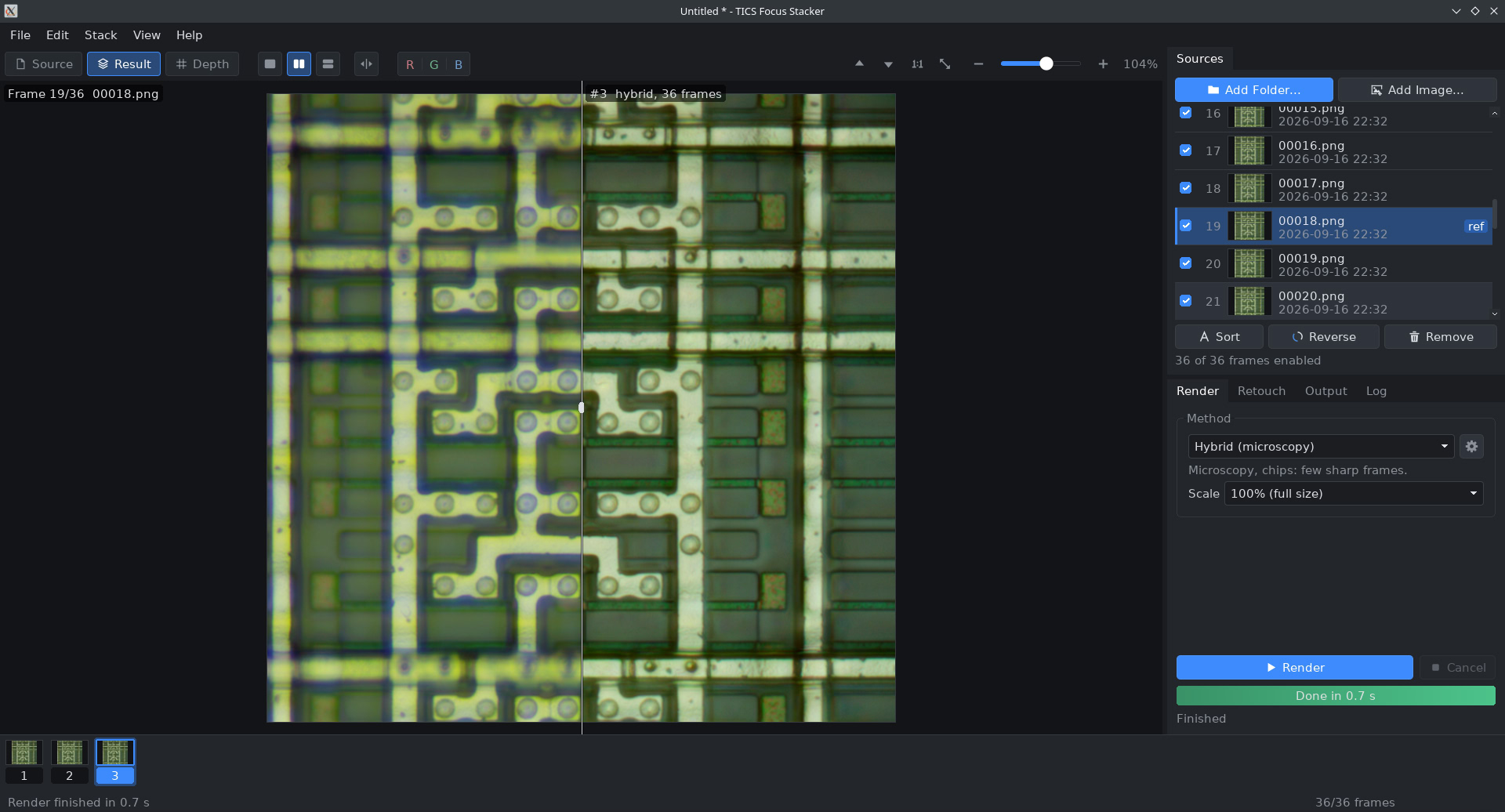
Features
- Rich and lightweight interface with DPI scaling
- A wide variety of focus stacking algorithms, including
- Depth map
- Pyramid: multi-focus image fusion method based on Laplacian pyramid
- Hybrid: tailored for high magnification silicon chips captures based on state of the art algorithms
- Focal surface: tailored for low magnification silicon chips when leveling is off
- Guided filter: image fusion with guided filtering
- Weighted average: similar to Enfuse, very fast
- Wavelet: shift-invariant wavelets in place of the Laplacian pyramid
- Optional pre alignment of images
- Optional post alignment of R/G/B channels to fix lateral chromatic aberrations
- Source / Result comparison interfaces
- Built-in simple retouching tools
- Supports RAW images
- Batch processing
- Command line interface: tics_focus_stacker cli –help
- (1.2) Slabbing
- (1.2) Composition and masking
- (1.2) DNG export for RAW input
- (1.3) OpenCL GPU acceleration
Webapp
If you don’t want to run a third party binary on your computer, you can try this webassembly version instead. Note that the webapp is slower than the native version, have memory limitations and some features are disabled (like the batch processing).
Downloads
- Silicon Chip stack example
- 2026-09-25 Version 1.1.0
- Windows build (64-bit)
- Debian Bookworm
- 2026-10-08 Version 1.2.2 Beta
- Windows build (64-bit)
- Debian Bookworm
- 2026-10-12 Version 1.3.1 Beta with experimental OpenCL support
- Windows build (64-bit)
- Debian Bookworm
Note: works perfectly on Linux using Wine.
Important: OpenCL is disabled by default. Enable it Help > Performances or in Preferences.
Microscopy usage
My main use of this software is for silicon chips photography, but most modes are compatible for macrophotography in general.
How to fix longitudinal and transverse chromatic aberrations
To correct LCA and TCA, enable the following options:
- Separate color channels: stacks R, G and B channels independently.
If your stack is large enough, this will completely fix longitudinal CA. - Align color channels: after focus stacking, this option will just align the R, G and B channels.
This will fix transverse CA (as tca_correct from Hugin panorama suite).
Recommended methods for die shots:
- Hybrid: artifact free and sharp images even at high magnification with very shallow depth of field.
- Depth map: provides smooth results with faster computation times than hybrid.
- Focal surface: this one is not really a focus stacking method.
Each pixel in the final image is drawn from a single frame of the stack.
Best for unleveled samples when you need a result that reflects direct observation.
Important note: if your Z axis is not aligned correctly, enable the alignment setting (cog button on the right of the method).
Macrophotography usage
For macrophotography, most popular options are the depth and pyramid methods.
By default, all methods except hybrid have alignment enabled to correct focus breathing (changed with v1.2).
You can press the cog button on the right of the method to enable/disable alignment.
Disclaimer
This is a personal tool I developed on my free time for my own needs.
THE SOFTWARE IS PROVIDED "AS IS", WITHOUT WARRANTY OF ANY KIND, EXPRESS OR IMPLIED,
INCLUDING BUT NOT LIMITED TO THE WARRANTIES OF MERCHANTABILITY, FITNESS FOR A
PARTICULAR PURPOSE AND NONINFRINGEMENT.

IN NO EVENT SHALL THE AUTHORS OR COPYRIGHT HOLDERS BE LIABLE FOR ANY CLAIM, DAMAGES
OR OTHER LIABILITY, WHETHER IN AN ACTION OF CONTRACT, TORT OR OTHERWISE, ARISING FROM,
OUT OF OR IN CONNECTION WITH THE SOFTWARE OR THE USE OR OTHER DEALINGS IN THE SOFTWARE.

YOU ASSUME TOTAL RESPONSIBILITY AND RISK FOR YOUR USE OF THE SOFTWARE.
Leave a Comment